In the previous articles we set up IP networking between the host and the guest so that VMs get a stable TCP/IP connection that survives snapshot restores. We then used network namespaces to isolate each VM's networking stack so we can run many VMs from a single snapshot.
This gives us host↔guest connectivity - the guest can ping 172.16.0.1 and the host can reach 172.16.0.2 - but
the guest can't reach the outside world. If you try ping 8.8.8.8 from inside the VM, the packets have nowhere to go.
Let's fix that.
The problem
Each VM lives in its own network namespace with a TAP device connecting it to the host side of that namespace.
The guest has a default route pointing to 172.16.0.1 (the host end of the TAP), but that's where the path ends.
The namespace has no connection to the host's physical network interface, so packets destined for the internet
just get dropped.
We need to build a path from each namespace, through the host's root network stack, and out to the real network.
Architecture
The standard approach is to create a bridge in the root namespace and connect each VM's namespace to it using veth pairs. The bridge acts as a virtual switch - any namespace plugged into it can talk to any other namespace and, with the right routing rules, to the outside world.
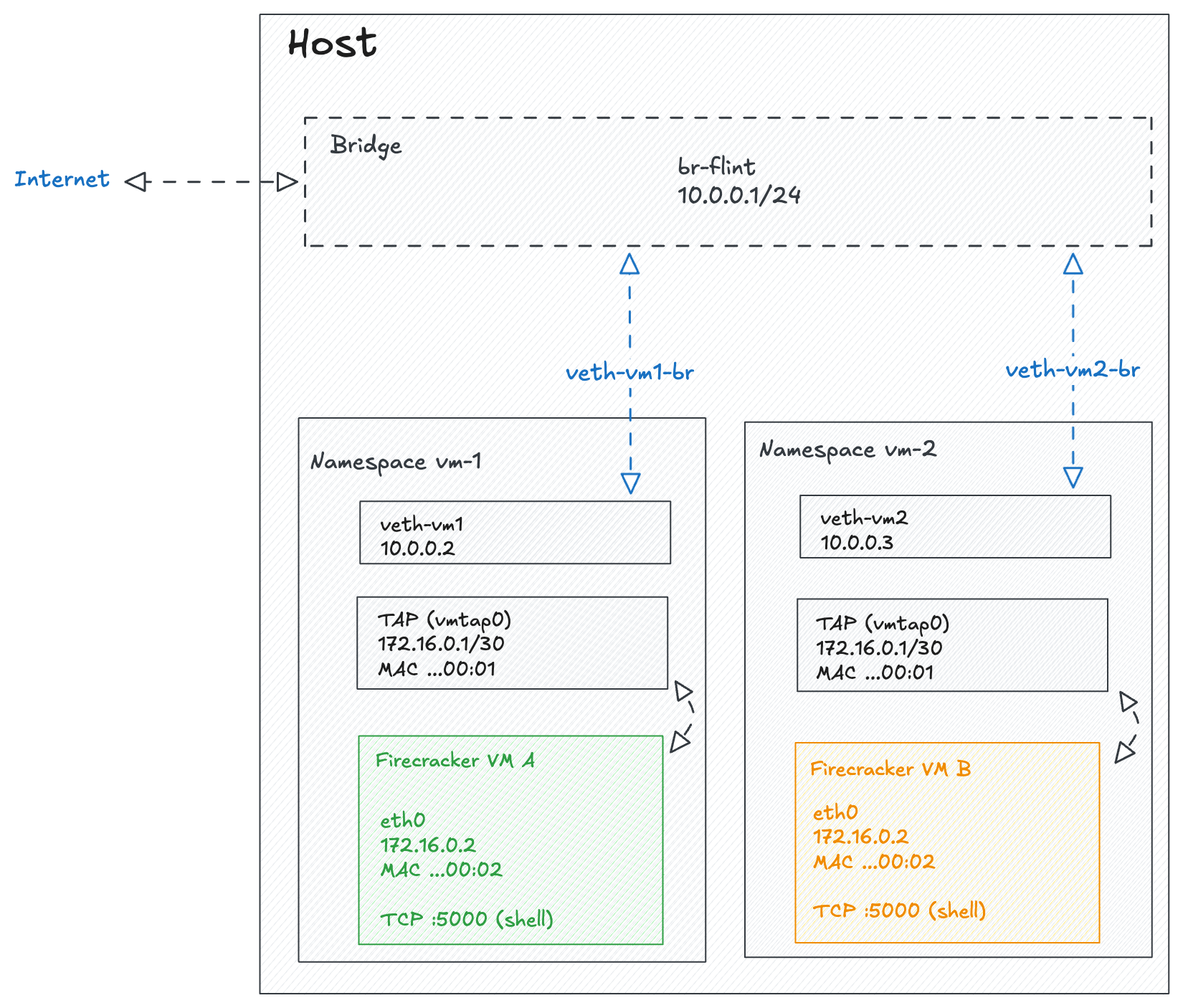
Here are the key concepts:
- Bridge: A virtual network switch in the root namespace. Think of it like a physical switch - anything plugged into it can communicate with anything else on the same bridge.
- Veth pair: Similar to a TAP device but for connecting two namespaces instead of a VM and a host. Both are virtual network pipes with two ends - the difference is what sits on each side. A TAP crosses the host/guest boundary (Firecracker attaches to one end, the guest kernel sees
eth0on the other), while a veth pair stays entirely in the host's network stack and connects two namespaces together. We need both because there are two boundaries to cross: the TAP gets packets out of the VM, and the veth gets them out of the namespace. - IP forwarding: A kernel setting (
net.ipv4.ip_forward) that allows the host to route packets between interfaces. Without this, the kernel drops packets that aren't addressed to the host itself. - NAT / Masquerade: An iptables rule that rewrites the source IP of outgoing packets to match the host's external IP. This is what allows the guest's private IP to communicate with the internet - reply packets get rewritten back and forwarded to the correct namespace.
The packet flow looks like this: guest (172.16.0.2) -> TAP device -> namespace veth -> bridge (10.0.0.1) -> iptables masquerade -> host's physical interface -> internet.
Implementation
Setting up the bridge
The bridge is a one-time setup in the root namespace. It acts as the central switch that all VM namespaces connect to:
# Create the bridge
ip link add br-flint type bridge
ip addr add 10.0.0.1/24 dev br-flint
ip link set br-flint up

# Enable IP forwarding so the host routes packets between interfaces
sysctl -w net.ipv4.ip_forward=1

# Masquerade traffic from the bridge subnet so it can reach the internet
iptables -t nat -A POSTROUTING -s 10.0.0.0/24 ! -o br-flint -j MASQUERADE
The masquerade rule is the key piece - it rewrites the source IP of packets leaving the bridge subnet so that reply packets from the internet find their way back.
Connecting a VM to the bridge
For each VM, we need to create a veth pair and wire it up between the VM's namespace and the bridge.
Assuming the namespace fc-vm1 already exists with its TAP device (from the
previous post):
# Create a veth pair
ip link add veth-vm1 type veth peer name veth-vm1-br

# Attach the bridge end (no IP needed, the bridge handles switching)
ip link set veth-vm1-br master br-flint
ip link set veth-vm1-br up

# Move the namespace end into the VM's namespace
ip link set veth-vm1 netns fc-vm1

# Inside the namespace: assign an IP, bring up, set default route
ip netns exec fc-vm1 ip addr add 10.0.0.2/24 dev veth-vm1
ip netns exec fc-vm1 ip link set veth-vm1 up
ip netns exec fc-vm1 ip route add default via 10.0.0.1

# Enable IP forwarding inside the namespace
ip netns exec fc-vm1 sysctl -w net.ipv4.ip_forward=1

# Masquerade traffic from the TAP subnet so guest traffic gets NATed
# to the namespace's veth IP before it hits the bridge
ip netns exec fc-vm1 iptables -t nat -A POSTROUTING -s 172.16.0.0/30 ! -o tap-golden -j MASQUERADE
Each VM gets a unique IP on the 10.0.0.0/24 subnet (e.g. 10.0.0.2, 10.0.0.3, etc.). The double NAT
might look odd but it keeps things clean - the guest doesn't need to know about the bridge network, and
the bridge doesn't need to know about the TAP network.
Updating the guest init script
The guest needs a DNS resolver to turn domain names into IP addresses. Update the init script to add a nameserver:
sudo tee "$MOUNT_POINT/etc/init-network.sh" > /dev/null << 'EOF'
#!/bin/sh
mount -t proc proc /proc
mount -t sysfs sys /sys
mount -t devtmpfs dev /dev
mkdir -p /dev/pts
mount -t devpts devpts /dev/pts

# Configure the guest network interface
ip addr add 172.16.0.2 dev eth0
ip link set eth0 up
ip route add default via 172.16.0.1

# Set up DNS
echo "nameserver 8.8.8.8" > /etc/resolv.conf

exec /bin/sh
EOF
sudo chmod +x "$MOUNT_POINT/etc/init-network.sh"Testing
Once the VM is running, you can test internet connectivity from inside the guest:
# Test raw IP connectivity
ping -c 3 8.8.8.8

# Test DNS resolution and HTTP
wget -qO- http://example.com
If ping works but wget doesn't resolve the domain, double-check that /etc/resolv.conf was written correctly
in the init script.
Cleanup
When you delete a network namespace (ip netns del fc-vm1), the veth pair is automatically destroyed since
one end lived inside that namespace. The bridge persists across VM lifecycles by design - it's shared
infrastructure that only needs to be created once.