In the previous article we covered how to start a single VM, we now need to figure out how to run many VMs on the same machine.
Firecracker snapshots
Firecracker snapshots are key to getting to ~50ms boot times for VMs. Snapshots capture the full state of the VM (memory and CPU state) and saves them to disk, they can then be used to restart a VM without incurring the initialisation cost of creating a VM from scratch.
Snapshots are easy to create in Firecracker, you first pause the VM and then send the snapshot command:
# Pause the VM
curl --unix-socket /tmp/firecracker.socket -i \
  -X PATCH 'http://localhost/vm' \
  -H 'Accept: application/json' \
  -H 'Content-Type: application/json' \
  -d '{
    "state": "Paused"
  }'

# Create the snapshot
curl --unix-socket /tmp/firecracker.socket -i \
  -X PUT 'http://localhost/snapshot/create' \
  -H 'Accept: application/json' \
  -H 'Content-Type: application/json' \
  -d '{
    "snapshot_type": "Full",
    "snapshot_path": "/path/to/vmstate",
    "mem_file_path": "/path/to/mem"
  }'
You can then restore the snapshots using:
# Load the snapshot
curl --unix-socket /tmp/firecracker.socket -i \
  -X PUT 'http://localhost/snapshot/load' \
  -H 'Accept: application/json' \
  -H 'Content-Type: application/json' \
  -d '{
    "snapshot_path": "/path/to/vmstate",
    "mem_backend": {
      "backend_type": "File",
      "backend_path": "/path/to/mem"
    },
    "enable_diff_snapshots": false,
    "resume_vm": false
  }'

# Resume the VM
curl --unix-socket /tmp/firecracker.socket -i \
  -X PATCH 'http://localhost/vm' \
  -H 'Accept: application/json' \
  -H 'Content-Type: application/json' \
  -d '{
    "state": "Resumed"
  }'
Creating many VMs from a single snapshot
There are two main challenges with creating many VMs from a single snapshot:
- They all share the same filesystem
- They all share the same networking configuration
As a result, our host doesn't know how to communicate with a specific VM due the network configuration issue and even if it did, they all share the same filesystem. Let's fix these two issues.
Creating filesystems for each VM
Each time we start a new VM, we need a new filesystem. While we could just copy over the full filesystem for each VM, this is not very space efficient.
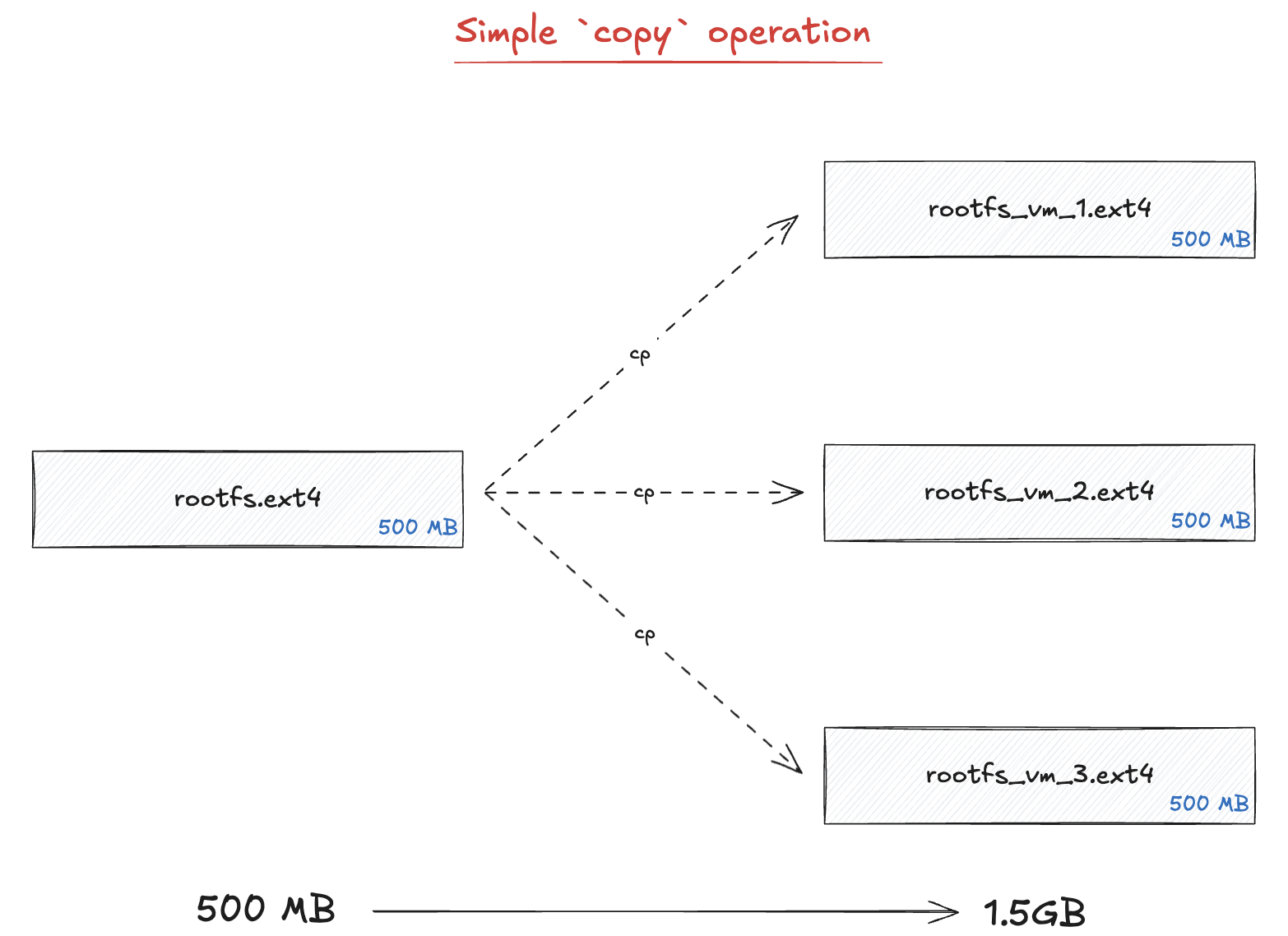
Instead of copying the full file, we are going to use the concept of copy on write (COW)
file clones. The idea is that every VM will share the same blocks of data, however if one VM
writes to a block of data, we copy it and edit it. As a result of this, the cp operation
is very fast and there is just a very small overhead when writing or editing files in a VM.
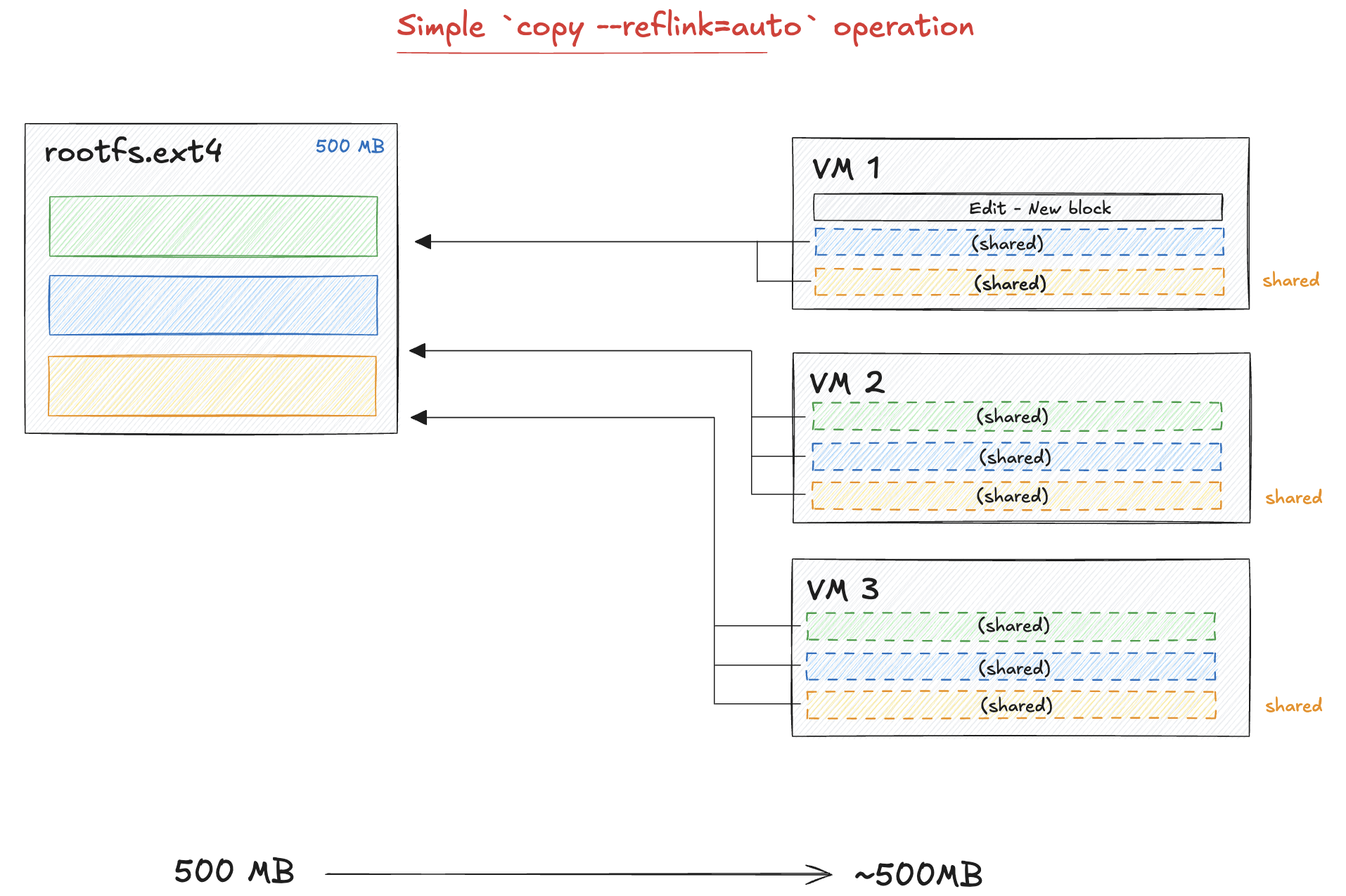
To do this, all we need to do is to add the option "--reflink=auto" when
running the cp command:
cp --reflink=auto /root/firecracker-vm/rootfs.ext4 /path/to/destination/rootfs.ext4Unique networking stack for VMs
As we've seen, snapshotting a VM with Firecracker captures the memory and device state which includes the guest network configuration. While this makes it easy to restore a VM, it makes it challenging to create many VMs from a single snapshot as they would all share the same IP.
The solution to this is to use network namespaces on the host OS. Each namespace provides an isolated network
stack, so the same IP can be reused across namespaces without conflict.
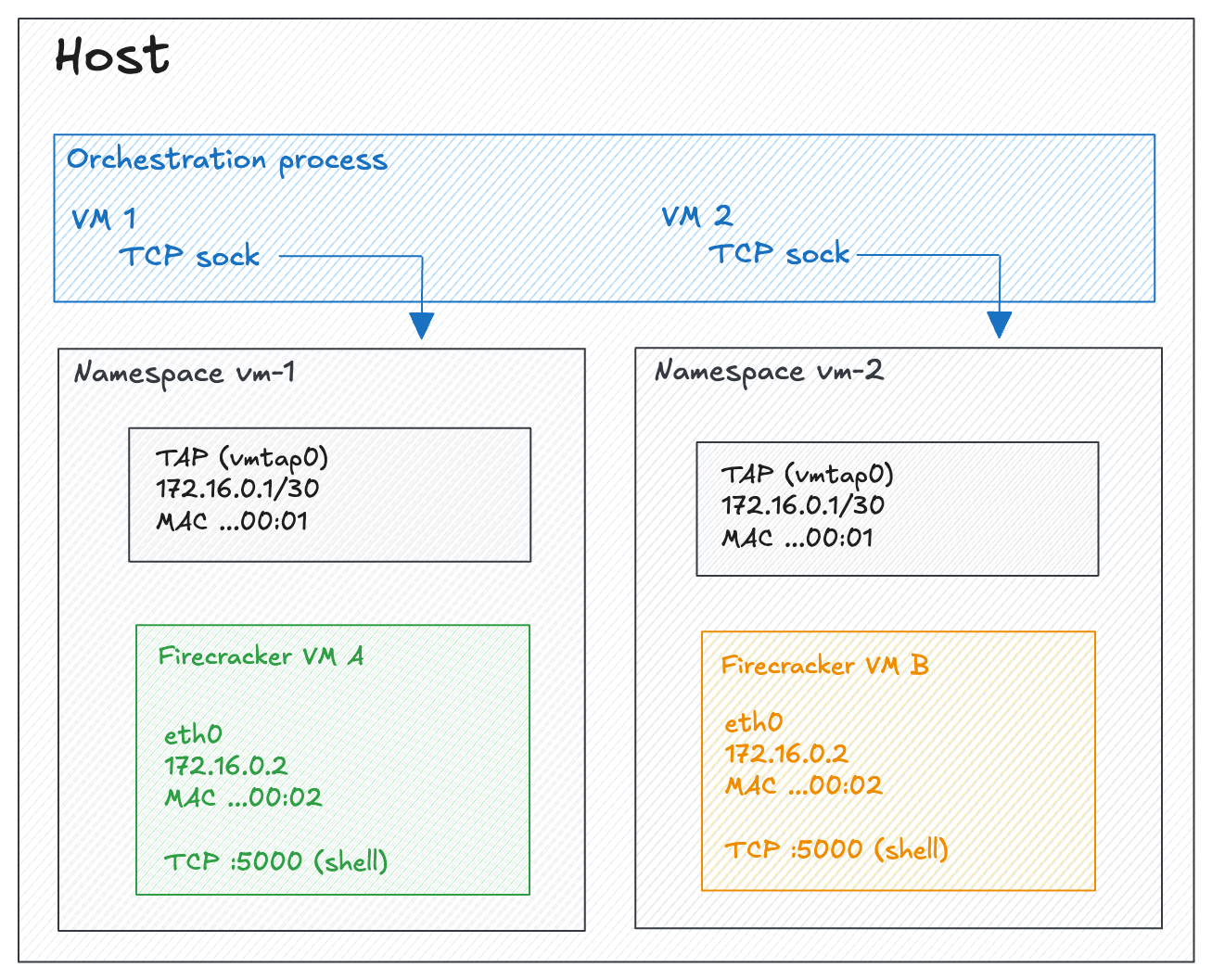
In addition to using namespaces, we will also create a unique MAC address and static ARP entry so that the first TCP connection doesn't need an ARP round-trip:
# Create the namespace
ip netns add fc-vm1

# Create a TAP device inside the namespace
ip netns exec fc-vm1 ip tuntap add dev tap-golden mode tap
ip netns exec fc-vm1 ip addr add 172.16.0.1/30 dev tap-golden
ip netns exec fc-vm1 ip link set tap-golden up

# Pre-seed ARP table with the guest's MAC address
ip netns exec fc-vm1 ip neigh add 172.16.0.2 lladdr 06:00:AC:10:00:02 dev tap-golden nud permanent
Benchmarking VM startup times
We are going to benchmark VM startup times using the same methodology as ComputeSDKs benchmarking scripts: sequentially start VMs, wait until we can connect to them, destroy them and start a new one. We'll track two key metrics:
- How long it takes for a VM to start
- How many VMs we can start per minute
As a baseline, without using snapshots it takes around ~933ms to start a VM with the majority of the time taken by waiting for the kernel to boot (~880ms). Snapshots should allow us to get that time down to less than 50ms.
Benchmarks with snapshots
When using snapshots, the startup times drop
| Avg | P95 | |
|---|---|---|
| Ready time | 260 ms | 292 ms |
| Throughput | 3.84 VMs/s | |
| Top bottleneck: copy rootfs | 142 ms | 171 ms |
| Top bottleneck: exec command | 57 ms | 67 ms |
While we are not quite at the 50ms goal we set, we decreased startup times by a factor of 8x !
Using rootfs pools
We can see from the benchmark results that one of the remaining bottlenecks is copying the rootfs
file for each VM. To optimize this, we can create a pool of rootfs files that are ready to go so that
on each VM creation call we just take one from the pool cutting this operations to less than 0.5ms.
As we are using copy on write, there aren't many downsides to this approach and we will just need to make sure that we create them fast enough in the background which can be easily achieved with some multi-threading
| Avg | P95 | |
|---|---|---|
| Ready time | 120 ms | 138 ms |
| Throughput | 8.33 VMs/s | |
| Top bottleneck: exec command | 59 ms | 74 ms |
| Top bottleneck: tcp connect | 39 ms | 49 ms |
With further optimizations like replacing socat with a lightweight C relay that keeps a single shell alive across connections (avoiding the fork/exec/PTY overhead on every request), we were able to bring the average ready time down to 74ms at 13.49 VMs/s.1
Footnotes
-
After these optimizations, the per-step breakdown shows
exec commanddropping from ~59ms to ~9ms avg, with the remaining bottleneck beingtcp connectat ~41ms avg. ↩